In Autorespond you can set up invoice numbering entirely to your own liking. You decide the starting number, the format and any prefixes or suffixes. The system uses the WooCommerce PDF Invoices & Packing Slips plugin (WP Overnight) that is integrated into the platform for this.
Invoice management in Autorespond is based on WooCommerce PDF Invoices & Packing Slips, included in your package. Read the WooCommerce PDF Invoices & Packing Slips documentation
Where to find the invoice number settings #
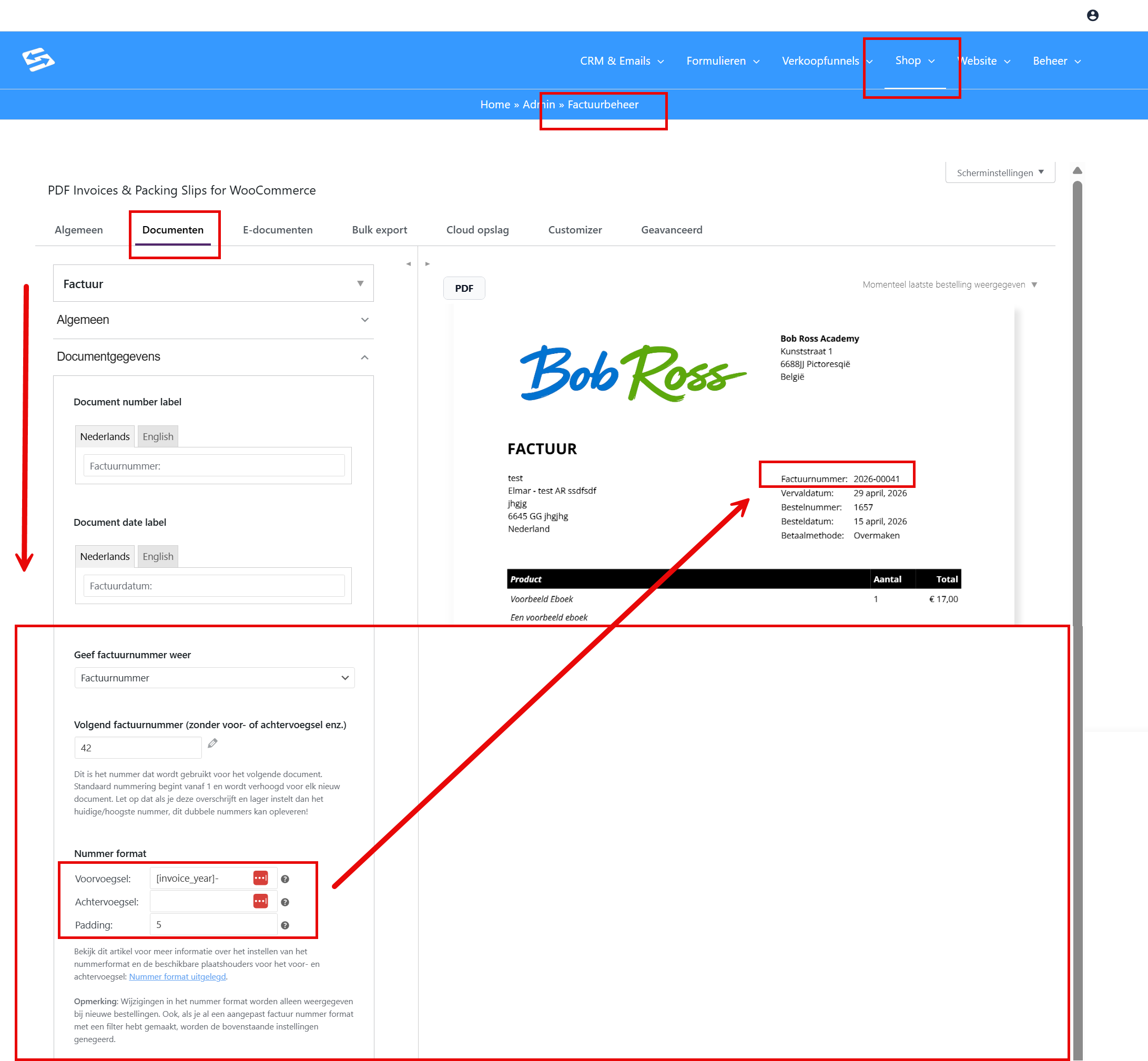
Go to Shop → Invoice management and open the ‘Documents’ tab. Then click the ‘Document details’ sub-tab. This is where you find all the settings for invoice numbering.
Setting the next invoice number #
In the ‘Next invoice number’ field you decide which number the next invoice will get. By default the numbering starts at 1 and increases automatically with each new invoice.
Important: Never set this number lower than the current highest invoice number. Otherwise duplicate invoice numbers will occur. Only increase the number if you are certain that no existing invoice already uses it.
Adjusting the number format #
The number format determines what the invoice number looks like. You have three options:
- Prefix: text or a placeholder before the number (for example INV- or 2025-)
- Suffix: text or a placeholder after the number
- Padding: the minimum width of the numeric part (padding 4 turns number 1 into 0001)
Changes to the number format only apply to new orders. Existing invoices keep their original formatting.
Using dynamic placeholders #
You can use dynamic placeholders in the prefix and the suffix. That way you automatically include the year or the date in the invoice number.
Based on the order date #
[order_number]the order number[order_day]the day of the order[order_month]the month of the order[order_year]the year of the order[order_date="Ymd"]the order date in a PHP date format of your choice
Based on the invoice date #
[invoice_day]the day of the invoice[invoice_month]the month of the invoice[invoice_year]the year of the invoice (the most used placeholder)[invoice_date="Ymd"]the invoice date in a PHP date format of your choice
Practical examples #
Here are concrete examples of what different settings look like:
- Prefix: INV-[invoice_year]- gives invoice number INV-2025-0001
- Prefix: [invoice_year]- with padding 4 gives 2025-0001
- Empty prefix, suffix: -[invoice_year] gives 0001-2025
- Prefix: [invoice_date=”m-Y”]- gives 01-2025-0001 (month-year-number)
Starting invoice numbering again each year #
Do you want to start at invoice number 1 again every year? Then set the ‘Next invoice number’ field back to 1 manually at the start of the new year. Always use [invoice_year] in your prefix, so that invoices from different years never have the same number.
Example: with the prefix 2025- the invoices start at 2025-0001. In January 2026 you set the next invoice number back to 1 and change the prefix to 2026-.
Frequently asked questions #
Can I change the invoice number of an existing invoice? #
No, the invoice number of an existing invoice cannot be changed. Changes to the numbering settings only apply to new orders and invoices.
What happens if I set a new format? #
New invoices get the new format, but existing invoices keep their original formatting. This prevents confusion in your administration.
Can I combine letters and numbers in the invoice number? #
Yes, through the prefix and the suffix you can combine letters, numbers and placeholders. For example: INV-2025-0001 or 0001-INV.
How do I avoid duplicate invoice numbers? #
Never set the next invoice number lower than the current highest number. Always use placeholders such as [invoice_year] if you start numbering again each period.
For more information about the basic settings of invoice management, see also Setting up PDF invoices.


