People stay where they are seen. The leaderboard makes appreciation visible: members earn points when others appreciate their posts and comments, climb through levels and appear in the ranking. Together with badges and the verified tick, you give your most active members a stage, and your community a reason to share something that little bit more often.
The community and course features in Autorespond are based on FluentCommunity, included in your package. Read the English documentation
1. How the points work #
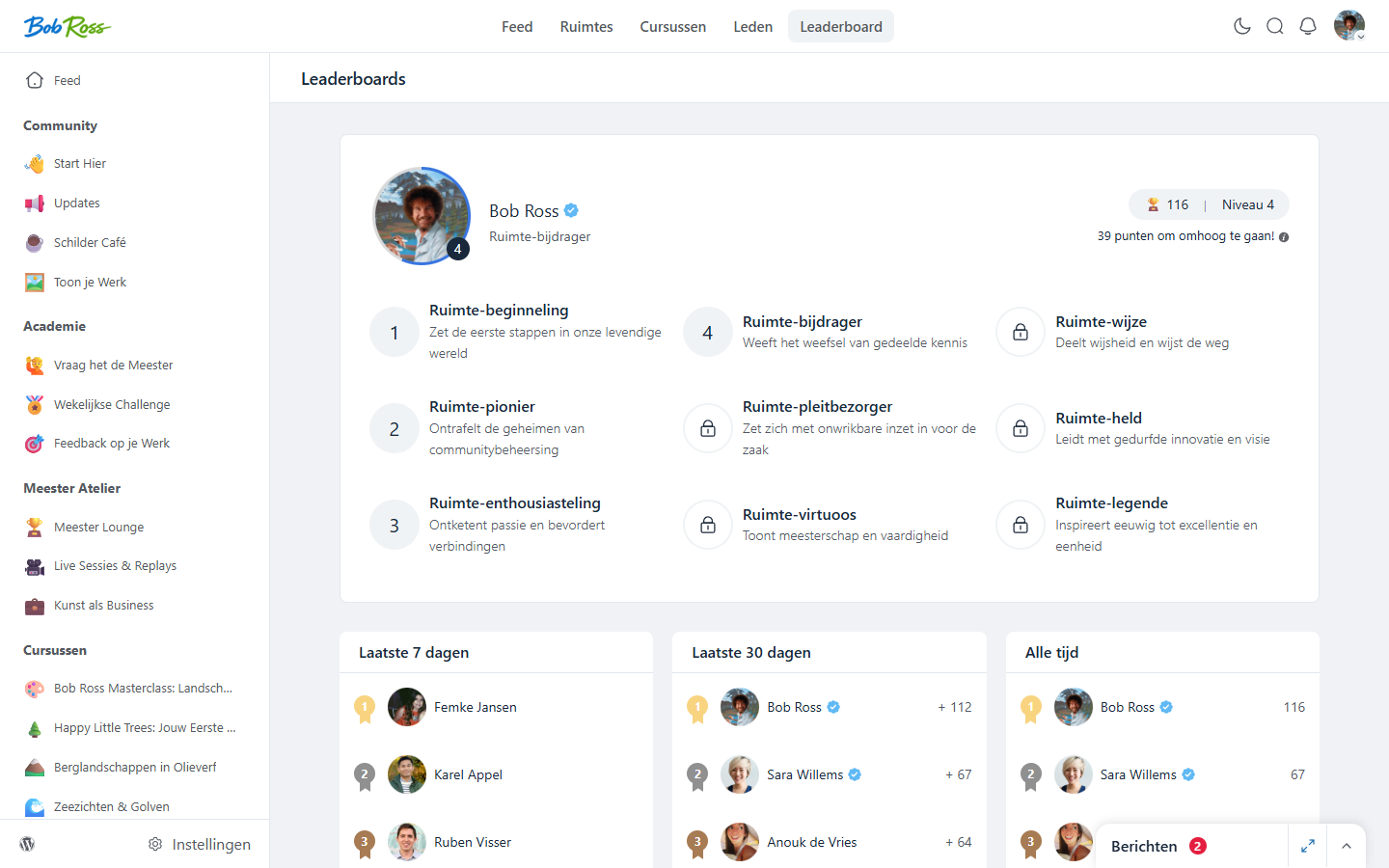
The principle is deliberately simple: a member receives a point when someone else appreciates their post or comment (a like). Posting does not earn points, being appreciated does, which rewards quality instead of volume. Switch on the leaderboard module under Settings → Features & add-ons; members then find the ranking through Leaderboard in the portal menu, with three views: the last 7 days, the last 30 days and all time.
2. Levels: from beginner to legend #
Alongside the ranking, every member works through levels based on their total number of points. Each level has a name and a threshold; on the leaderboard members see how many points they still need for the next level. That small bar is a surprisingly strong motivator. When a new level is reached you can have something happen automatically: the automation trigger User Level (Leaderboard) Upgraded starts a flow, for example a congratulations email or a discount code for your top contributors.
3. Badges and the verified tick #
- Badges, visible distinctions on the profile and next to a member’s name. Create badges that mean something in your community: “Challenge winner”, “Certified”, “Founding member”. You can award them manually through the member, or automatically with the automation action Add Badge To User (for example after completing a course).
- Verified tick, the familiar blue tick for team members, experts or regular faces. It helps new members see whose answers carry authority. This tick can also be awarded or removed through an automation.
4. How to use gamification wisely #
- Celebrate the monthly winner, a fixed post on the first of the month with the top three of the past 30 days. It takes two minutes and yields a month of motivation.
- Show appreciation yourself, your likes are points for your members. Walk through the feed briefly every day.
- Attach a real benefit, give your highest level a genuine reward (early access, a free session). The trigger from step 2 handles the execution automatically.
- Keep it positive, a leaderboard rewards, it does not punish. Avoid “bottom of the list” communication; not everyone has to take part.
Frequently asked questions #
Do I count on the leaderboard as an administrator? #
By default, yes. If you are permanently at the top of your own ranking, you can exclude administrators from the leaderboard, which gives your members the stage.
Can I change the level names? #
Yes, the levels and their point thresholds can be configured. Names in the language and tone of your community (“Apprentice”, “Master”) feel more personal than the default names.
Do members lose points if a like is removed? #
Yes, the count follows the actual appreciations. If a like or a post disappears, the associated points no longer count.


