Would you like your website, landing pages and blogs to be found more easily in search engines such as Google? Within Autorespond you have access to powerful tools to arrange your search engine optimisation (SEO) down to the last detail.
In this article we give you a tour of the SEO dashboard and show you where to find the most important basic functions.
Where do I find the SEO settings? #
All settings for search engine optimisation are gathered under the heading ‘Website’ in your main menu.
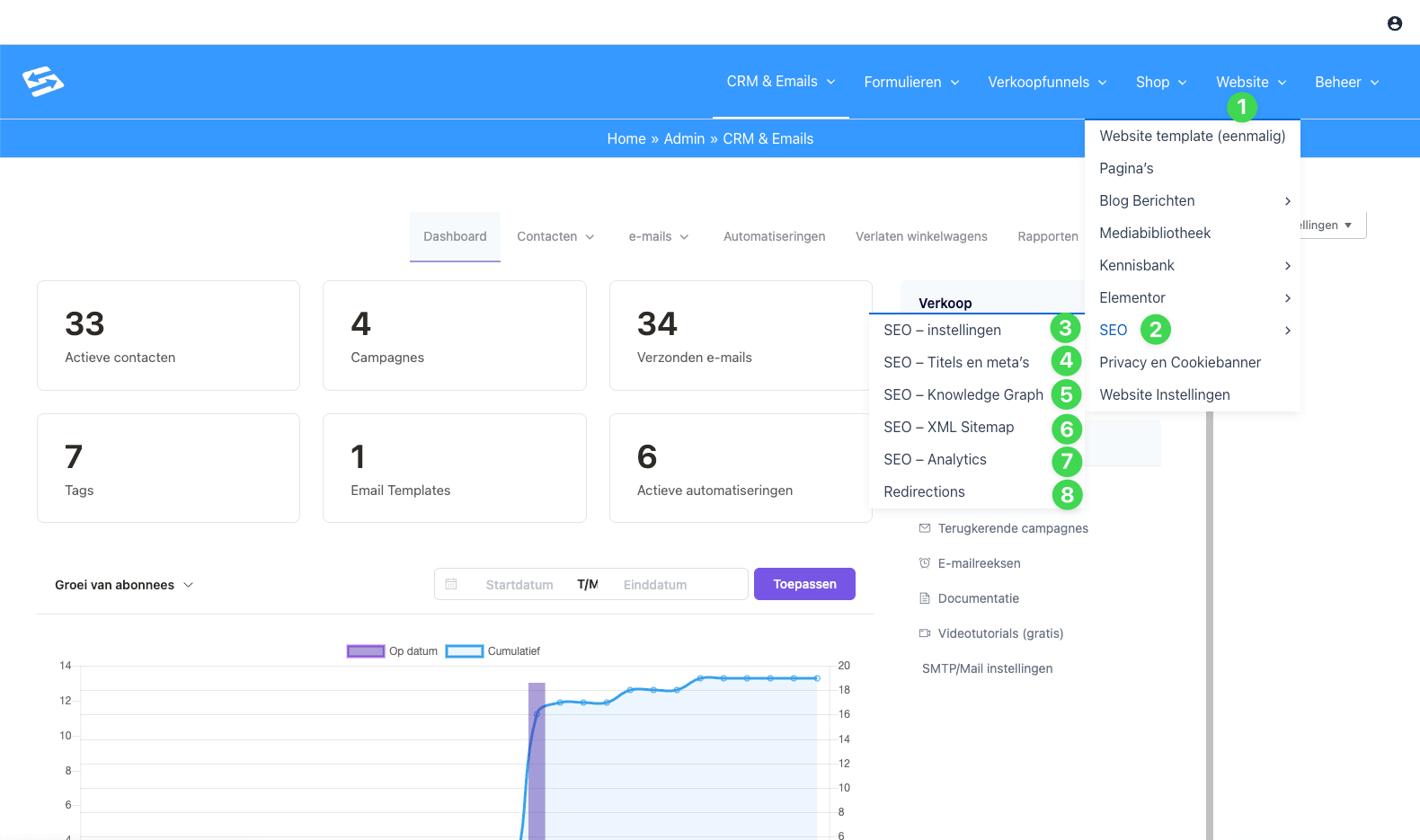
Follow the green numbering in the image above to navigate:
- Website: In the blue menu bar at the top, click the heading Website (1).
- SEO: In the drop-down menu that appears, move your mouse to SEO (2).
A submenu with various options then opens. Below we briefly explain what you can set for each part.
The SEO sections explained #
Once you have opened the SEO menu, you see the following options (matching the numbers in the image):
3. SEO – settings This is the starting point. Here you configure the general basic settings of your website. Think of settings that apply to your entire site, such as advanced indexing options. For most users the default settings are already fine here.
- Would you like to go deeper? Then read the article: SEO settings: the basics and advanced options
4. SEO – Titles and metas This is one of the most important sections. Here you determine how your pages look in the Google search results. You set templates here for your page titles and the meta descriptions (the short pieces of text below the link in Google).
- Want to know more? See: SEO settings: managing titles and metas
5. SEO – Knowledge Graph Do you want Google to know exactly who you or your organisation are? Here you fill in details such as your company logo, your type of organisation and links to your social media profiles. This helps search engines display your brand correctly in the so-called ‘knowledge panels’ beside the search results.
- Learn more about social networks and the Knowledge Graph in this article: Configuring the SEO settings for social networks
6. SEO – XML Sitemap An XML sitemap is a kind of map of your website made especially for search engines. It allows Google to find all your pages and blogs faster and more easily. In this menu you check whether your sitemap is switched on and which types of pages are included in it.
- Also read: SEO settings: configuring the XML sitemap
7. SEO – Analytics Measuring is knowing. Through this menu you can easily connect statistics tools (such as Google Analytics or Matomo) without having to tinker with the code of your website yourself.
- Need help connecting? Go to: Connect Google Analytics and tracking tools to your Autorespond platform
8. Redirections Have you changed the URL of a page or deleted an old page? With ‘Redirections’ you make sure visitors (and search engines) are automatically sent on to the correct new page. That way you avoid annoying “404 – Page not found” messages.
- Learn more about redirects in: How do I set up URL redirects in the SEO settings?
Frequently asked questions (FAQ) #
Do I need technical skills to use these SEO functions?
No, the basic settings are designed so that you can get started with them right away. If you want to make specific changes to titles or descriptions, you simply fill them in in text fields.
Does filling in these settings guarantee a number 1 position in Google?
Unfortunately no tool can guarantee that. These settings do make sure that the technical foundation of your site is perfectly in order, which is an essential condition for ranking well. Writing good content of course remains just as important.
I do not see the option ‘SEO’ under ‘Website’, how is that possible?
You may not have the right administrator rights, or the SEO module has not been activated for your account. Get in touch with support if this menu item is missing.
What happens if I set nothing at all?
Autorespond already tries to make safe choices for your SEO by default. However, by going through the settings under Titles and metas (4) and the Knowledge Graph (5) yourself, you considerably increase the chance of becoming more visible and more professional in search engines.


