e-boekhouden.nl has developed its own integration for WooCommerce webshops. This integration passes orders automatically to your bookkeeping in e-boekhouden.nl through the WooCommerce API.
How to activate the e-boekhouden integration #
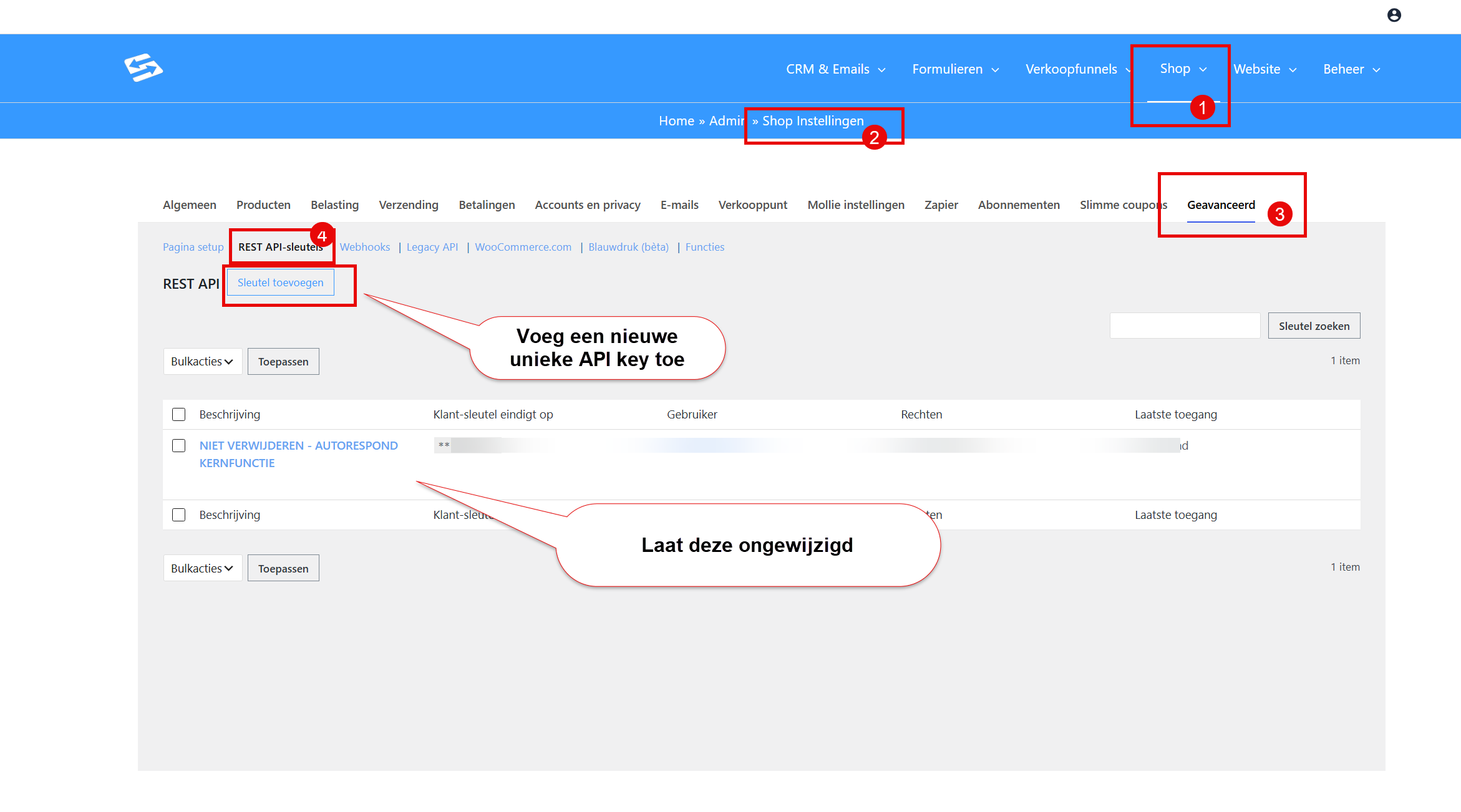
To connect e-boekhouden you need a unique API key from WooCommerce, which you create via the menu Shop > Shop settings, Advanced tab, ‘Rest API keys’ sub-tab:
Setting up the integration #
Follow the step-by-step guide from e-boekhouden for the configuration:
Official guide: https://secure20.e-boekhouden.nl/klantenservice/kennisbank/2023?menu=1
For invoices within the Autorespond package we use the plugin ‘WooCommerce PDF Invoices & Packing Slips’. You can therefore select it while setting up the integration, so that invoice numbers are sent along as well. See this explanation from e-boekhouden: https://secure20.e-boekhouden.nl/klantenservice/kennisbank/437?menu=1
That guide contains every step needed to set the integration up correctly, including the required API details and configuration options.
Support if something goes wrong #
Because e-boekhouden.nl developed this integration themselves, it is best to contact e-boekhouden support directly for technical problems or questions about how it works. They know the solution best and can help you with specific configurations and error messages.
For activating the API in your Autorespond environment you can of course contact Autorespond support.
What is synchronised #
The integration makes sure order details are passed to your e-boekhouden administration automatically. That saves manual data entry and creates a seamless transition between your webshop and your bookkeeping.
For more information about exactly which data is synchronised and how to configure specific settings, consult the e-boekhouden guide.
The e-boekhouden integration in Autorespond is made possible by a plugin developed by e-boekhouden.nl themselves, and can be activated on request by Autorespond support.
Frequently asked questions #
Are there any costs attached to the e-boekhouden integration? #
Activating the plugin in Autorespond is free. For the use of e-boekhouden.nl itself, their own rates and subscription terms apply.
Can I activate the integration myself? #
No, the plugin has to be activated by Autorespond support. Get in touch through the support portal to have the integration activated in your administration.
What if the integration does not work as expected? #
Contact e-boekhouden support first, because they developed the plugin and know best how it works. For problems with the activation you can contact Autorespond support.


