Do you want to know what your members really want? Do not ask them in a survey, let them vote. With a roadmap you gather ideas from your community and show visibly what you do with them: from “idea” through “planned” to “completed”. And with a project board you work on tasks together with a member or team, for example in a coaching programme. Both run on the project management module and fit seamlessly into your community portal.
The community and course features in Autorespond are based on FluentCommunity; roadmaps and project boards on FluentBoards, both included in your package. Read the English documentation
1. Setting up a roadmap #
- In the project management module, create a roadmap board with columns that tell your process, for example: Ideas → Planned → In progress → Completed.
- Fill the board with a few ideas of your own as a starting point, because an empty roadmap is not inviting.
- Publish the roadmap on a page and give that page the FluentCommunity Frame template, so it runs inside the portal (see the article on adding pages).
- Put a link to the roadmap in the portal menu or in the sidebar of a space.
2. Letting members contribute and vote #
On the roadmap, members can submit ideas and vote on each other’s ideas. In the roadmap settings you decide whether an account is needed for that and whether new contributors are automatically added as a contact in your CRM (with a tag, so you can follow up). Moderate new ideas before they become visible: that keeps the board clean.
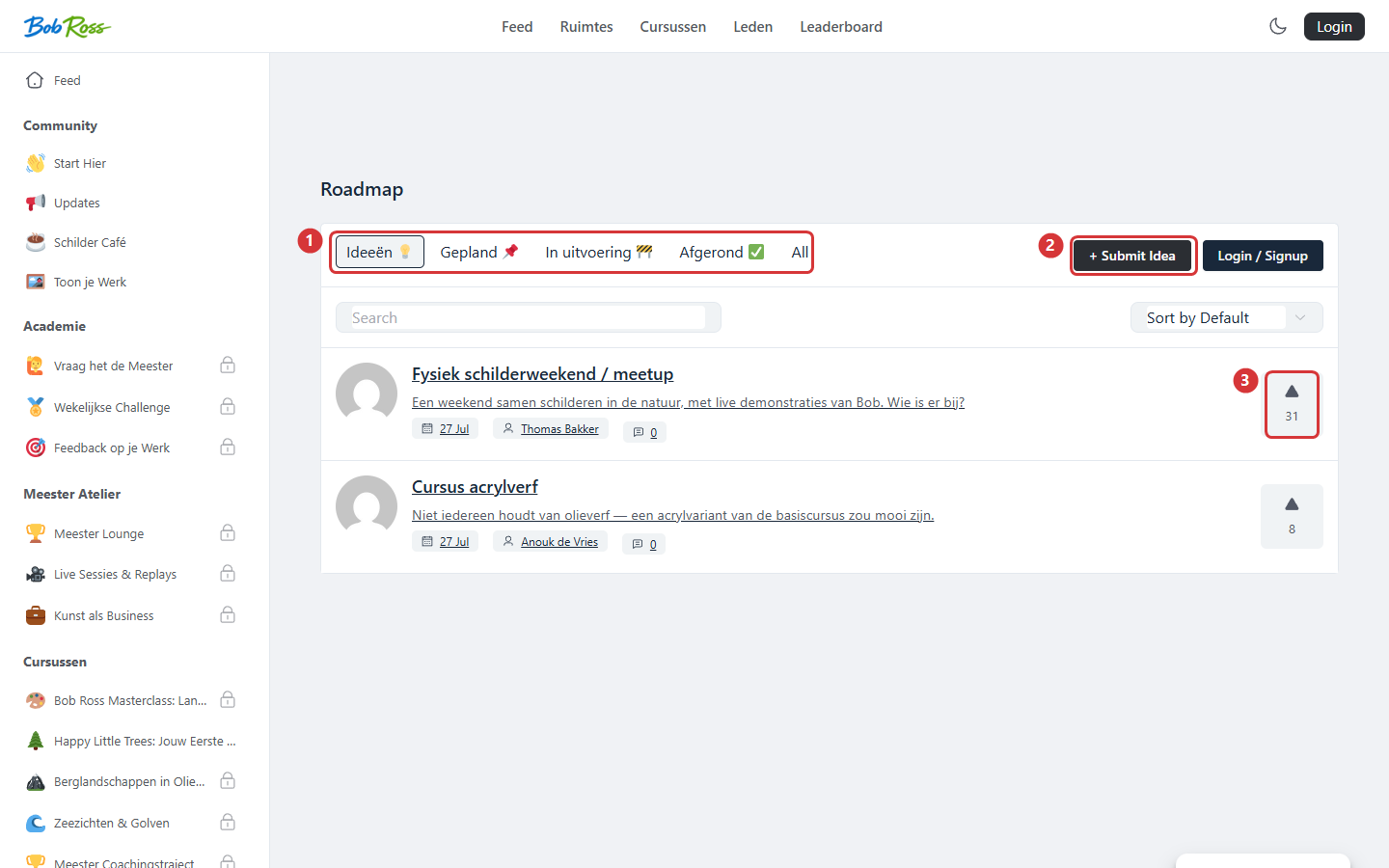
In the screenshot: 1) the columns per stage · 2) members submit ideas · 3) votes per idea.
The golden rule: move ideas visibly. Nothing builds as much trust as an idea that slides from “Ideas” to “Completed” with an announcement alongside it (“you voted, here it is”). The reverse is fine too: explain why something is not being scheduled. Both show that contributing matters.
3. A project board for working together #
A project board is a kanban board (tasks in columns) with a limited group of participants. In a community you use it for example for:
- Coaching programmes, one board per client with columns such as Intake → Goals → In progress → Completed. You and the client see and manage the tasks together; other members see nothing.
- Working groups, a team of members organises an event or challenge on a shared board.
- Your own content planning, the schedule of courses and posts, for your team only.
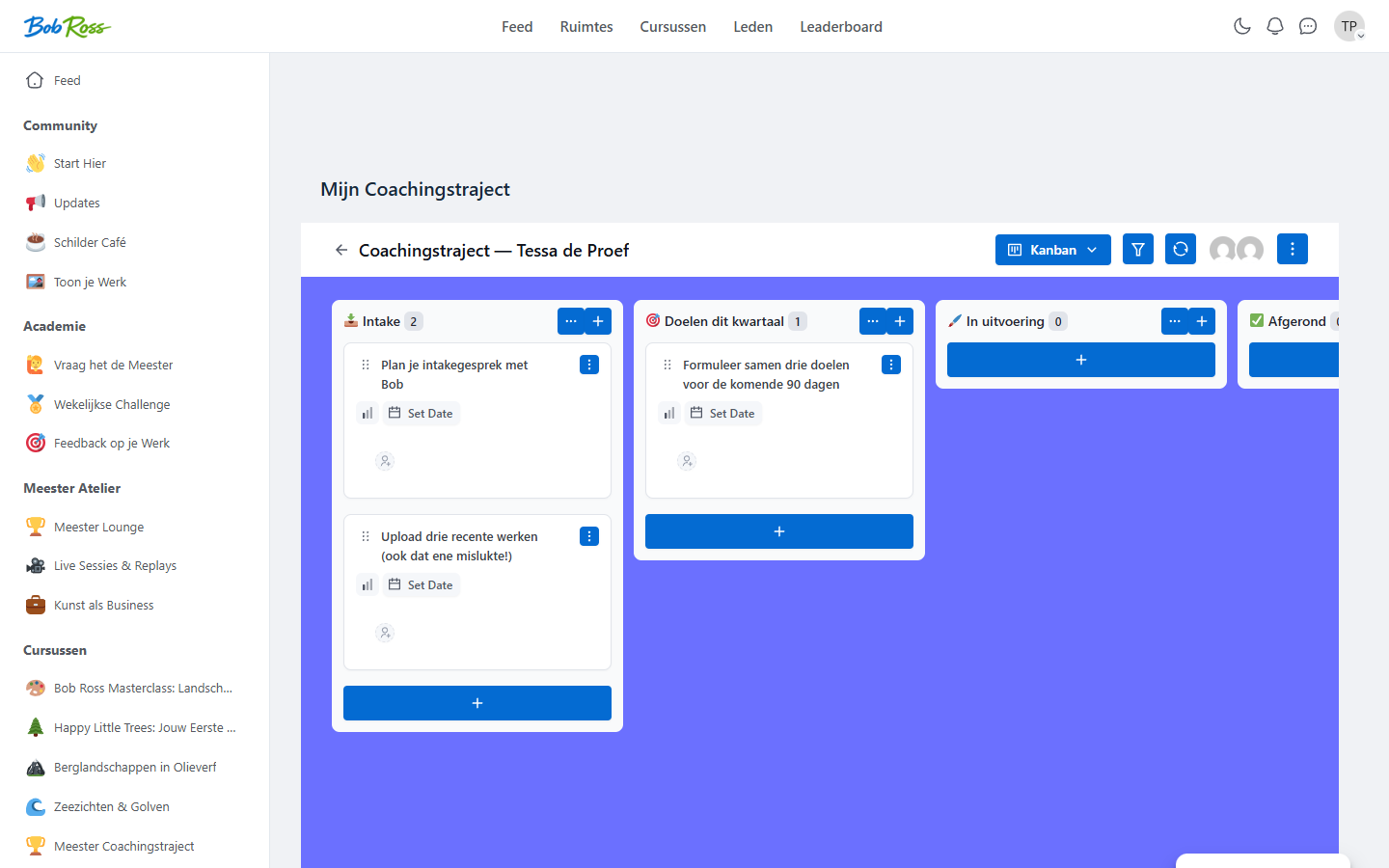
Only participants of a board can see it. Put the link to such a board (or to a page that shows the board) in the portal menu with visibility for the right member group, so that, for example, only your premium level gets the menu button “My programme”. Creating such a personal board can even happen automatically on a purchase; ask support about the options for your situation.
Frequently asked questions #
Can non-members see the roadmap? #
That is up to you: a public roadmap page is also a marketing instrument (visitors see that you are building and listening), while a restricted roadmap gives your members a sense of exclusivity.
Are contributors notified when their idea changes status? #
Yes, contributors can be informed automatically by email when their idea reaches another column.
What is the difference with a weekly challenge or a poll? #
A poll measures a snapshot, a challenge activates. The roadmap is your long term: an ongoing collection point for wishes with visible follow-up.


