Sometimes it is necessary to transfer an active subscription to another person: for example if a company subscription is in the name of an employee who is leaving, or if a customer hands the subscription over to someone else.
What changes and what does not? #
What changes:
- The subscription is linked to the new customer
- Future renewals are created under the new customer
- The new customer gets access to the subscription rights (depending on the settings)
What does NOT change:
- The parent order and all earlier renewal orders stay linked to the original customer. Those orders do not change and cannot be found in the order overview of the new customer.
- The payment and invoice history of the previous customer stays unchanged
Subscription management in Autorespond is based on WooCommerce Subscriptions, included in your package.
Step 1: Check whether the new customer already has an account #
A subscription can only be transferred to an existing WordPress user in the system. If the new customer does not have an account yet, you have to create one first.
Creating a new account:
- Go to Admin → Users and click Add new user
- Enter the name and email address
- Set the role to ‘Customer’
- Tick ‘Send the new user an email about their account’ if you want the customer to receive a welcome email – otherwise leave it empty (the customer then receives nothing)
- Click Add user
Step 2: Open the subscription #
- Go to Shop → Subscriptions
- Look up the subscription and click it to open it
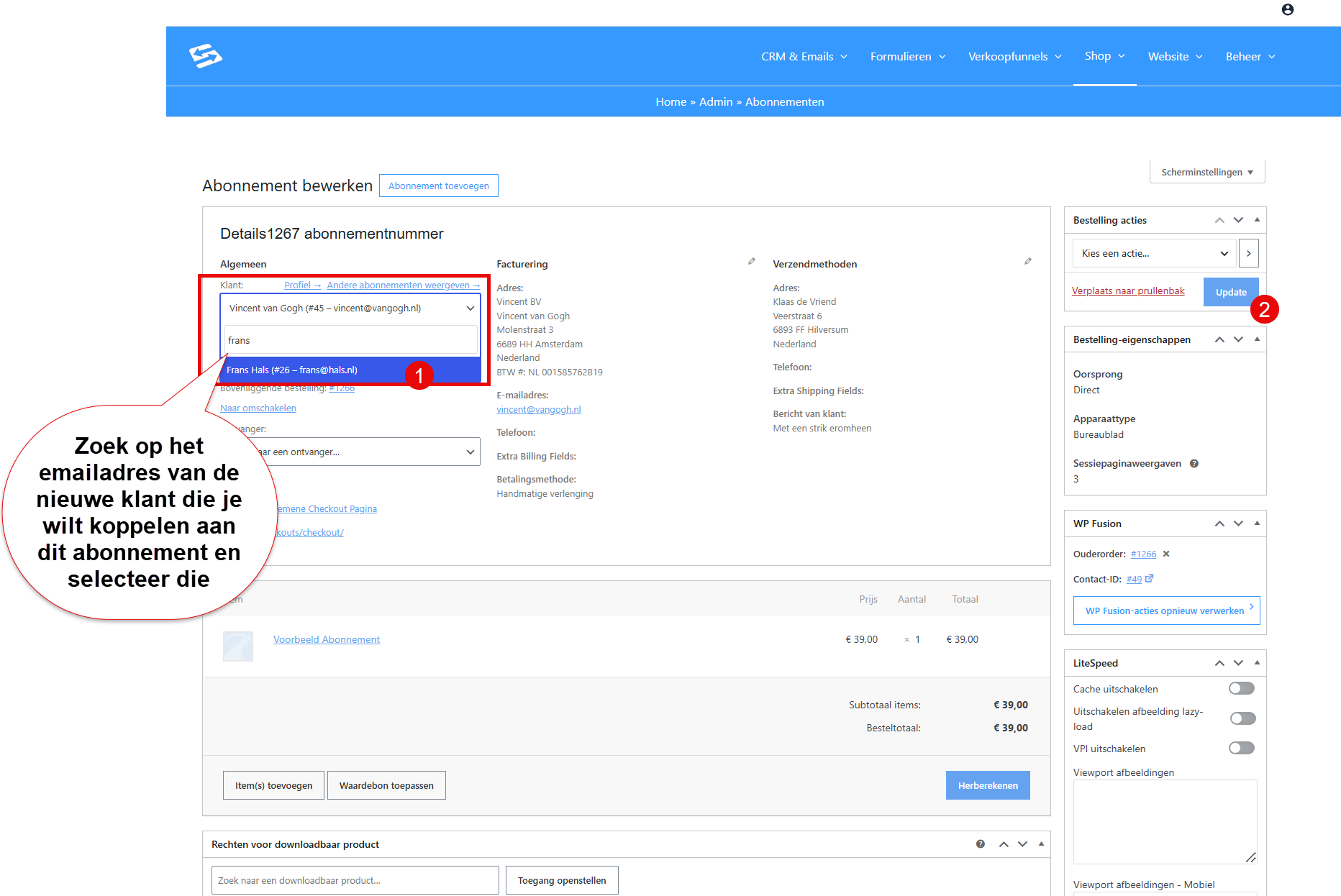
Step 3: Change the linked customer #
- At the top of the subscription page, click the name of the current customer (or the pencil icon next to it)
- A search field appears. Type the name or the email address of the new customer
- Select the right user from the suggestions
- Click ‘Update’ to save
After saving, the subscription is linked to the new customer. The system records this change as a note in the subscription.
For information about managing the subscription status, see also Subscription statuses: what do they mean and how do you end a subscription at the end of the term?
Frequently asked questions #
Can I transfer a subscription to someone who does not have an account yet? #
No, you first have to create a user account through Admin → Users before you can transfer the subscription.
Does the new customer see the old orders of the subscription? #
No, only the subscription itself is transferred. All previous orders stay visible with the original customer.
Is the payment method taken over automatically? #
No, the new customer has to set up a new payment method for future payments themselves. This can be done through their account page.


