Want to know exactly how many visitors come to your website, where they come from and which pages are the most popular? In Autorespond you connect Google Analytics 4 (GA4) and other tracking tools without having to dive into your website’s code. Below you can read where the settings are, what each option does and what to look out for.
The SEO and analytics settings in Autorespond are based on SEOPress, included in your package.
Step 1: Go to the Analytics settings #
In the top menu bar, click Website, go to SEO in the drop-down menu and click SEO – Analytics in the submenu. You will then see the screen below.
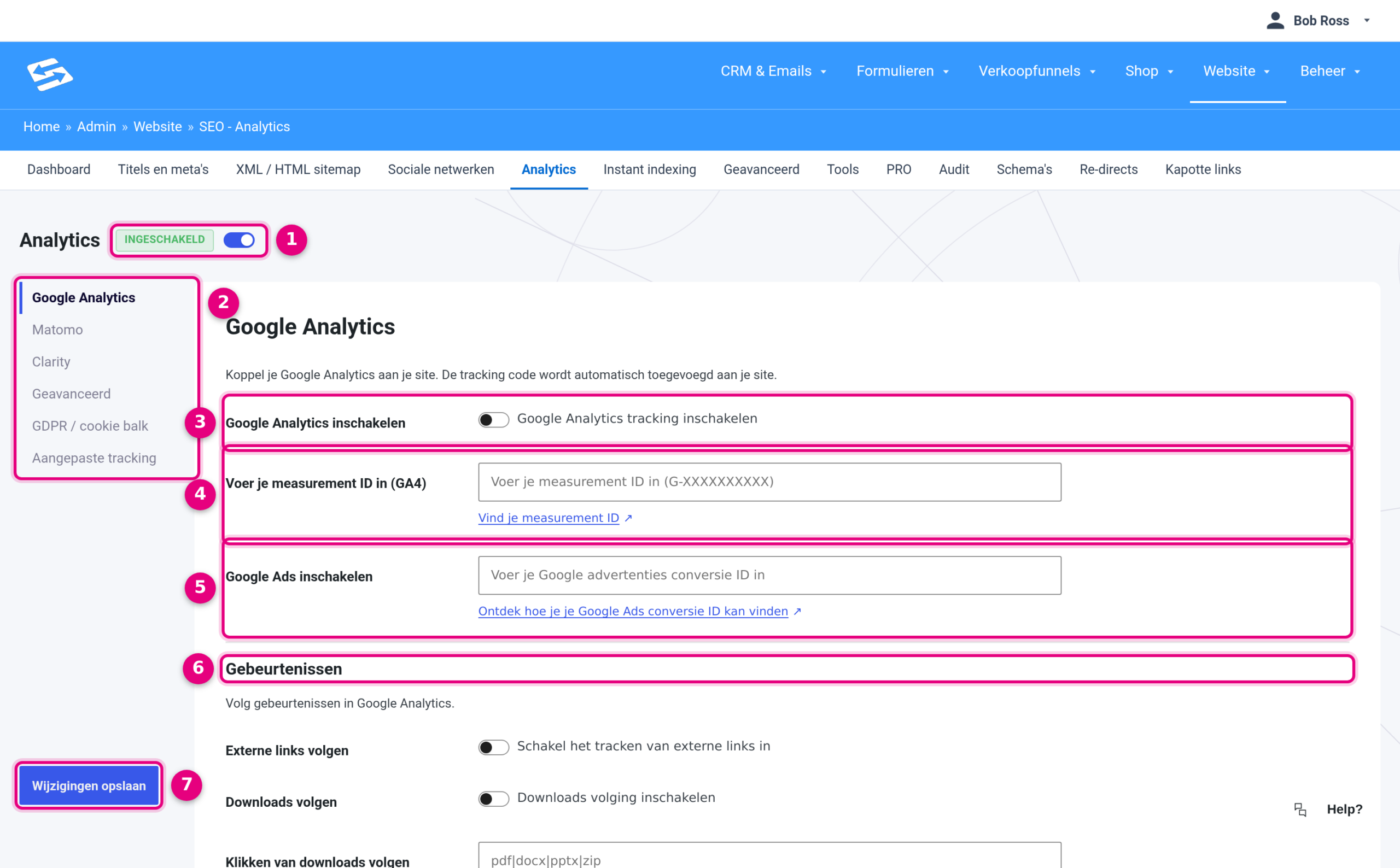
- Analytics main switch. As long as this is off, nothing is measured, whatever else you fill in. Switch it on; the label Enabled then appears next to the title.
- The tab menu on the left. Here you choose which tool or which part you are setting up. The tabs are explained separately below.
- Enable Google Analytics. Switch this on to have the Google Analytics tracking code placed on your site.
- Enter your measurement ID (GA4). Enter your code starting with G- here. Without this ID no data is passed on.
- Enable Google Ads. Do you advertise with Google Ads? Enter your conversion ID here (for example AW-123456789) to measure conversions.
- Events. In this block you switch on which actions you want to measure, such as tracking external links, downloads, affiliate and outbound links, clicks on phone numbers and the webshop events (purchases, product viewed, adding to and removing from the cart).
- Save changes. Your settings only take effect after you click this.
Step 2: Choose the right tab #
The menu on the left (2 in the image) has six tabs. You can use them independently of each other:
- Google Analytics: the most widely used option for statistics. This tab is explained above.
- Matomo: a privacy-friendly alternative to Google Analytics, using your own Matomo environment.
- Clarity: heatmaps and recordings of visitor behaviour, from Microsoft.
- Advanced: custom dimensions, which let you send the author, category, tag, post type or logged-in user to Google Analytics, plus the user roles you want to exclude from measurement (for example your own administrator account).
- GDPR / cookie bar: here you make sure measuring only starts after your visitor has given consent, and you set the texts, buttons and position of the consent bar.
- Custom tracking: here you place codes from other services, such as the Facebook Pixel or the LinkedIn Insight Tag, in the head or the body of your pages. See also Connect Google Tag Manager and tracking scripts through the SEO settings.
Where do you find your measurement ID? #
Log in to your Google Analytics account and go to Admin, then Data collection and modification, then Data streams. Click your web stream: the Measurement ID starting with G- is shown at the top right. Copy that code exactly into the field at point 4 and then click Save changes.
Frequently asked questions #
Where do I find my Google Analytics Measurement ID?
Your Measurement ID is in your Google Analytics 4 property. Go to Admin, then Data collection and modification, then Data streams. Click your web stream and you will see the Measurement ID starting with G- at the top right.
Do I need a cookie banner if I set this up?
Yes, in most cases you do, certainly with Google Analytics. You set up your site’s cookie banner through Website → Privacy and Cookie banner. In addition, in the GDPR / cookie bar tab you make sure Analytics only measures after your visitor has given consent.
Can I use Google Analytics and Matomo at the same time?
Yes: fill in both tabs and switch them both on. Keep in mind that loading two tracking scripts can slightly affect the loading time of your pages.
I don’t see any data coming into Google Analytics. What now?
It can take 24 to 48 hours before data is visible in GA4. Also check that the main switch at point 1 and the switch at point 3 are both on, that your measurement ID has no typos and that you clicked Save changes. With the Realtime report in Google Analytics you can see straight away whether your own visit is being recorded. If you only measure after consent, you only count visitors who have accepted the cookie banner.


