Redirecting an unsubscriber to your own page after unsubscribing #
When a contact unsubscribes from your newsletter, a standard unsubscribe page appears with a form on which they can state the reason for unsubscribing. This standard text and design cannot be changed, but you can set unsubscribers to be redirected to a page of your own after they unsubscribe.
This feature is part of the CRM & email system, included in your package.
How the standard unsubscribe page works #
The standard unsubscribe page contains the following elements, which cannot be changed:
- Title: “Unsubscribe”
- Opening text: “We are sorry to see you go”
- Email address display: “Your email address [email address]”
- Question about the reason: “Let us know the reason (optional):”
The contact is then given a choice of reasons for unsubscribing:
- I no longer want to receive these emails
- I never signed up for this email list
- The emails are inappropriate
- The emails are spam
- Other (with a free text field)
After clicking the “Unsubscribe” button, a confirmation message is shown by default stating that the unsubscribe was successful.
Setting up a redirect to your own page #
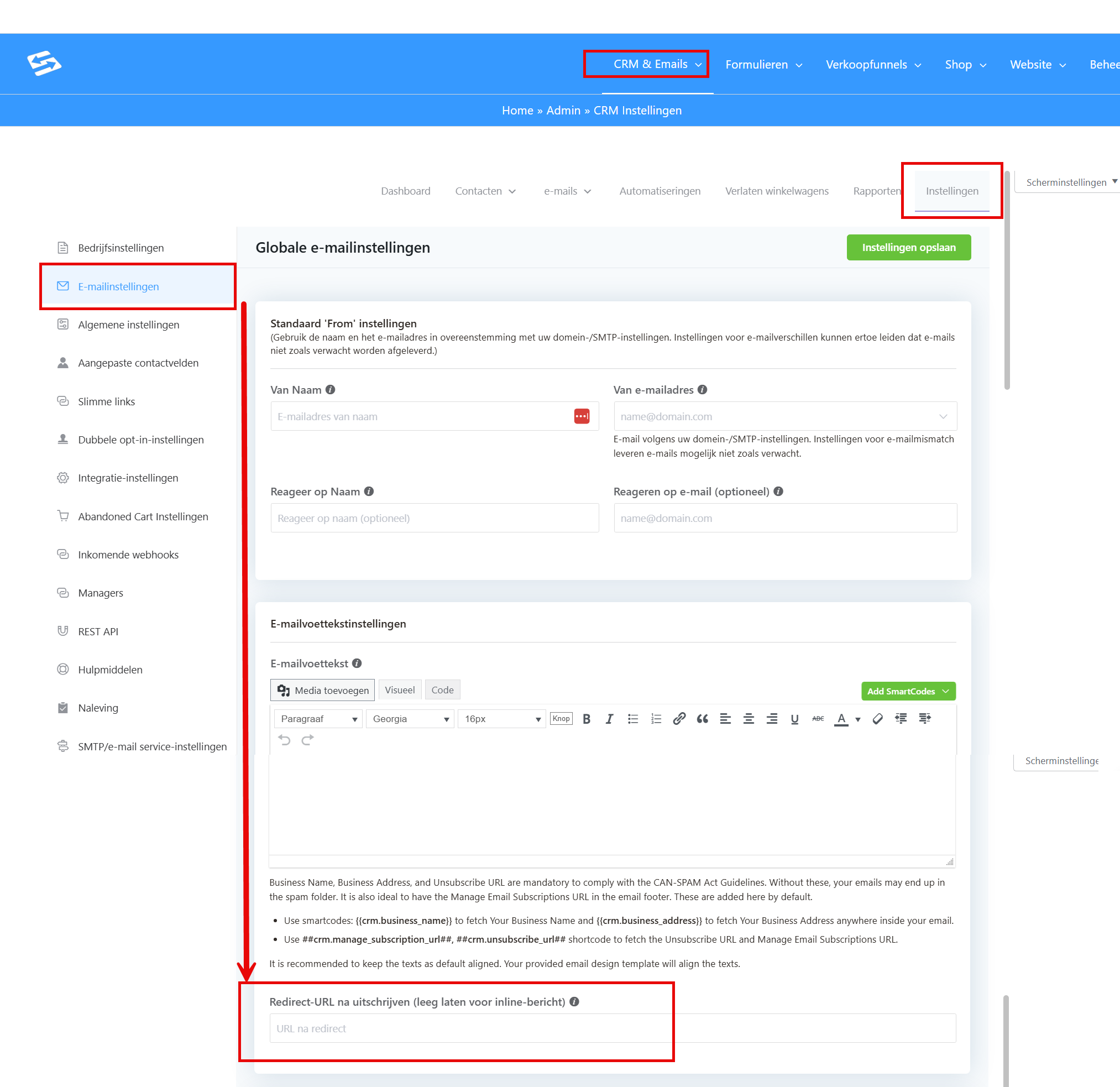
If you want to redirect unsubscribers to a thank-you page of your own instead of showing the standard confirmation message, you can set this up as follows:
- Go to CRM & Emails → CRM Settings
- Open the Email settings tab
- Scroll down to the “Email footer settings” section
- Find the “Unsubscribe redirect URL” field
- Enter the full URL of your own thank-you page here (for example: https://yourdomain.com/unsubscribed-thank-you)
- Save the settings
When to redirect and when not to #
- Leaving the field empty: contacts see the standard confirmation message after unsubscribing
- Entering a URL: contacts are redirected to your own page after unsubscribing
On your own thank-you page you decide the text, the design and any follow-up actions entirely yourself.
Frequently asked questions #
Can I change the text on the unsubscribe page? #
No, the text and design of the standard unsubscribe page cannot be changed. You can only set whether contacts are shown a page of your own after unsubscribing.
Can I change the reasons for unsubscribing? #
No, the standard reasons for unsubscribing are fixed and cannot be changed. Contacts can always enter a reason of their own under “Other”.
Can I see the unsubscribe reasons in my administration? #
Yes, the reasons for unsubscribing are recorded and can be found in the contact profile and in the unsubscribe reports.


