Overview #
Smartlinks are special, unique URLs that let your CRM carry out actions the moment a contact clicks them. They are used in emails, funnels and marketing automations to measure behaviour and trigger follow-up actions automatically.
This documentation gives an overview of how Smartlinks work, how you use them and which extra functionality is available, such as adding lists and tags automatically and logging existing users straight in.
Smart links in Autorespond are based on FluentCRM, and the licence for it is included in your Autorespond package. Read the English FluentCRM documentation
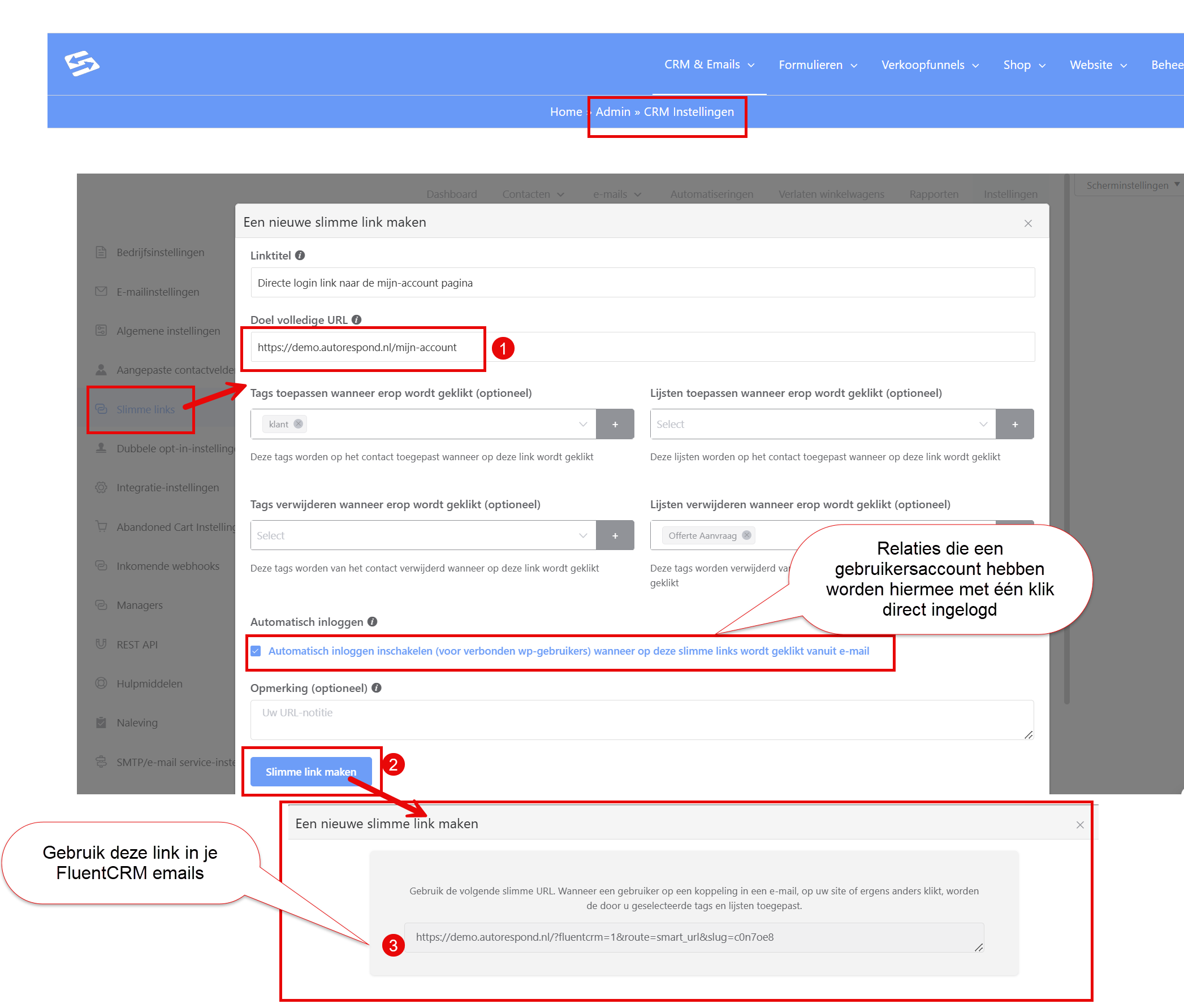
You create smartlinks through the menu CRM & Email > Settings, tab ‘Smart links’
What is a Smartlink #
A Smartlink is a link generated inside your CRM that is tied to one or more actions. When a contact clicks this link:
- the contact is recognised through unique tracking parameters;
- the actions you set up are carried out immediately (adding tags, for example);
- an automation can be started on the basis of that click.
Smartlinks are ideal for behaviour-based segmentation and for automating follow-up actions without forms or extra steps.
Adding lists and tags straight away #
With a Smartlink you can automatically:
- add one or more tags;
- add one or more lists;
- optionally remove existing tags or lists.
This happens immediately after the click. That means you can use Smartlinks for:
- building up interest profiles;
- segmentation based on click behaviour;
- triggering specific campaigns or automations.
Automatic login for existing users #
When a contact who clicks a Smartlink also has a linked user account in your system (a WordPress account, for example), the CRM can recognise this person and log them in straight away.
This is particularly suitable for:
- access to membership areas: if you use the community & courses module, you can send a smartlink to a course so that your users are logged in immediately.
- offering exclusive content: if you use hidden blog posts, for example, you can give your customers a link that logs them straight in to read their premium content
- simplifying login flows for existing customers: you can, for instance, send a smartlink to the WooCommerce my account area (by default at yourautoresponddomain.nl/my-account/), so the customer is logged in straight away and can download their own orders and invoices.
The automatic login only works when:
- the email address of the contact matches the user account;
- the Smartlink was opened from an email sent by your CRM.
Using Smartlinks in automations #
Smartlinks can act as a trigger inside an automation. As soon as a contact clicks a Smartlink, your CRM can start a workflow automatically.
Examples of automation scenarios:
- starting an onboarding flow when someone shows interest;
- triggering an upsell flow after a click on a product link;
- sending internal notifications to a team member;
- adding or removing tags to keep your segmentation dynamic.
The Smartlink trigger is reliable because it is based on click behaviour.
Creating a Smartlink #
- Go to the menu CRM & Email > Settings, tab ‘Smart links’
- Click New Smartlink.
- Choose the URL the link should point to.
- Select the actions that should be carried out:
- add or remove tags;
- add or remove lists;
- optional: log the contact in directly if they also have a user account.
- Save the Smartlink and use it in your emails or funnels.
The CRM adds tracking parameters automatically so the system can recognise the contact.
Best practices #
- Use clear link text so the reader knows where they are going.
- Always test Smartlinks with a test contact before you send a campaign. Note that a smartlink only works if you actually send the email. It does not work in a test email
- Use Smartlinks in onboarding and upsell flows to process behaviour automatically.
Summary #
Smartlinks in your CRM offer a powerful way to turn click behaviour straight into actions. You can add tags and lists automatically, start automations and even log users in automatically when they have a linked account. That makes Smartlinks an essential part of a modern, automated marketing strategy.


