Your email reputation determines whether your messages actually reach your contacts’ inbox. A poor reputation means your emails end up in the spam folder or are not delivered at all. With the right approach you build a strong reputation and keep it that way.
Autorespond monitors the spam rate and mail reputation per administration. As the sender, you are responsible yourself for following these best practices to protect your reputation.
Email marketing in Autorespond is based on FluentCRM Pro, included in your package.
Spread your mailings over a longer period #
Sending emails in bulk all at once can damage your reputation. Email providers see this as suspicious behaviour and may block your messages.
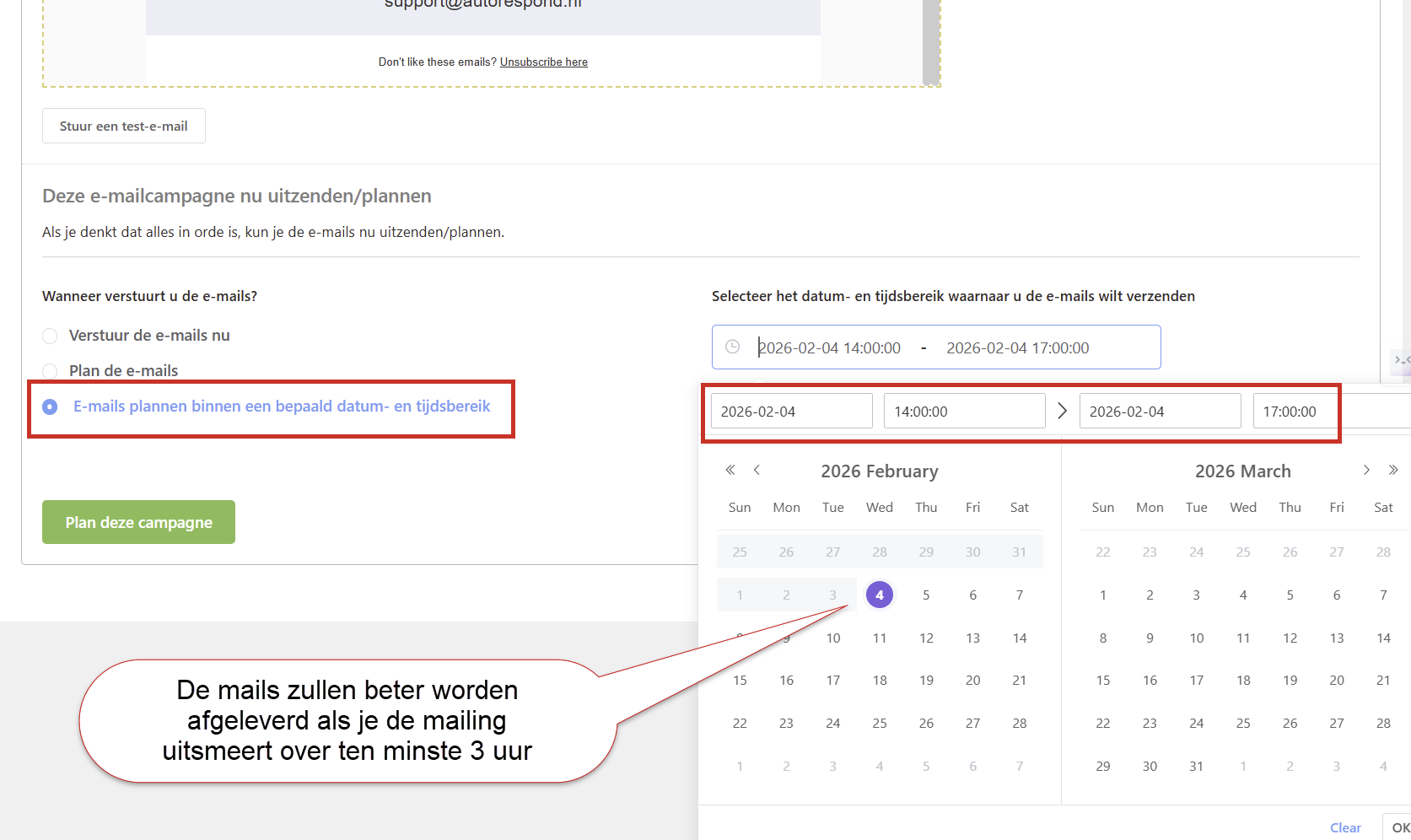
So always use the option ‘Schedule emails within a certain date and time range’ when you schedule a campaign. Set a range of 4 hours, for example, so that your emails are sent out spread over time instead of all at the same moment.
This matters most in the early stage of your email marketing. Spreading your emails means they are delivered and opened better, which benefits your reputation and leads to more opens in the future.
Teach new contacts to add you as a safe sender #
Automatic spam filters regularly block legitimate emails. By instructing new contacts straight away to add your sender address as a safe sender, you reduce that risk considerably.
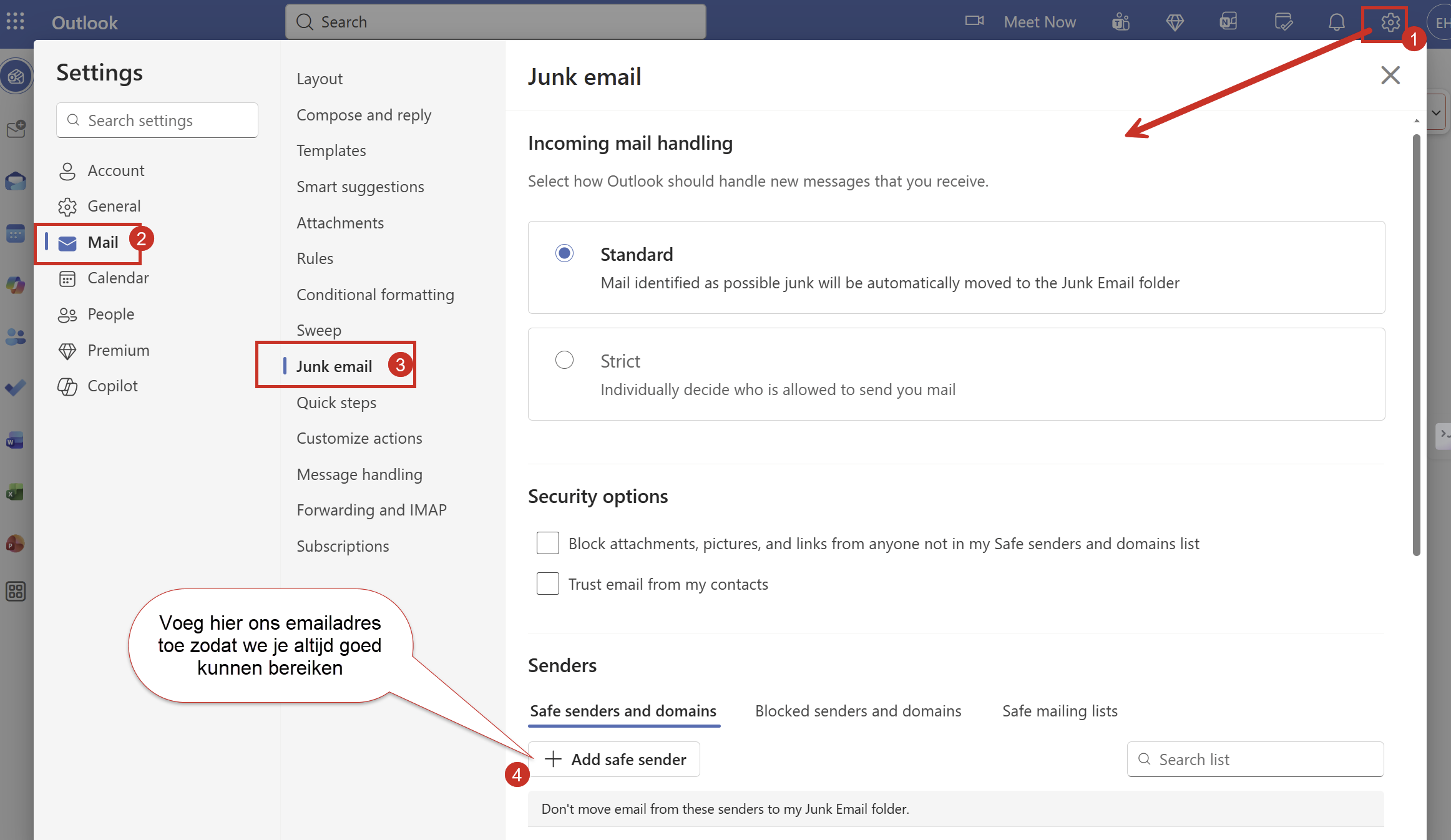
Add an instruction to your confirmation page after sign-up with a clear explanation of how contacts can whitelist your email address. Preferably use a visual instruction with screenshots for the various email providers.
You can also include this instruction in your first welcome email or as part of your double opt-in process. Feel free to use the image below:
Email your contact list regularly #
Consistency is crucial for a good email reputation. Email your active contacts at least once a month to keep your reputation in shape.
Avoid the “who are you again?” reaction #
Contacts you have not emailed for a long time have often forgotten that they signed up. If you suddenly send them a lot of emails again, you will quickly attract spam complaints.
For contacts who have not received an email for months, use a warm-up strategy: start with a single email in which you introduce yourself again and repeat the value you offer. After that, slowly build up the sending volume.
Clean up inactive contacts periodically #
Contacts who have not opened a single email for more than six months and register no clicks damage your reputation. They do count towards your sending statistics, but they produce no engagement.
Setting up a last chance campaign #
Before you delete inactive contacts, give them one last chance:
- Put all inactive contacts in a separate list (for example: ‘Inactive contacts’)
- Send an email with the subject ‘Your details will be deleted shortly’
- Write a fresh introduction explaining who you are and what value you offer
- Add a clear button with a smart link that automatically removes contacts from the inactive list when they click
- After a week, delete the contacts that are still on the inactive list
Setting up smart links for automatic actions #
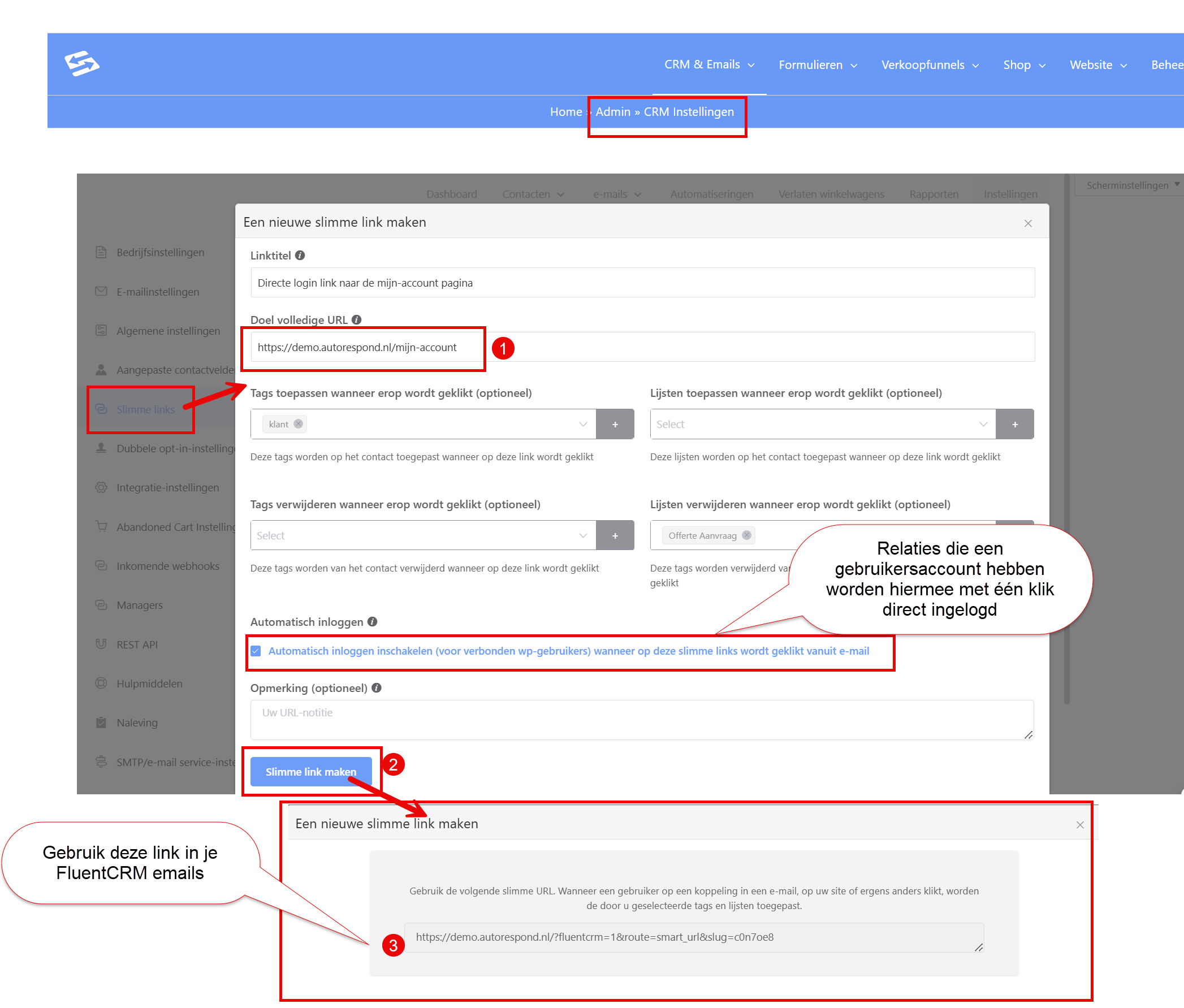
A smart link is a trackable link that can start actions automatically when someone clicks it. For your last chance campaign you set up a smart link that automatically removes the contact from the ‘Inactive contacts’ list.
You create smart links via CRM & Emails → CRM Settings → Smart links. Once created, you use the generated URL in your email to change list assignments automatically on a click.
For more information about automatic actions through smart links, see this detailed guide.
Frequently asked questions #
How often may I email at most without damaging my reputation? #
There is no fixed limit, but consistency matters more than frequency. It is better to email weekly on fixed days than irregularly. Keep an eye on your open and click statistics: if these fall structurally, you may be emailing too often.
What do I do if my emails suddenly end up in the spam folder? #
Check your sending behaviour over the past few weeks: have you suddenly sent a lot more email, used different subjects, or imported new contacts? Temporarily reduce your sending frequency and focus on highly relevant content for your most active contacts.
Can I use purchased email lists in Autorespond? #
No, never use purchased lists. These contacts have not given permission and will mark your emails as spam. That seriously damages your reputation and can lead to your mail server being blacklisted.


