If you sell subscription products through the Shop module in Autorespond, you are using WooCommerce Subscriptions. A frequently asked question is whether customers are obliged to create an account in order to take out a subscription. The short answer: technically yes, but in practice they need never notice it. In this article we explain exactly how that works and how to set it up so customers notice as little as possible.
Subscriptions in Autorespond are based on WooCommerce Subscriptions, included in your Shop & Sales Funnels extension.
Why are user accounts technically required for subscriptions? #
WooCommerce Subscriptions technically needs a user account in order to store a subscription. The subscription is stored in WordPress as an object that has to be linked to a specific user. Without that link the system cannot process renewals, cannot keep track of the subscription status and automatic payment cannot work.
A user account is also necessary for direct debit through Mollie (such as iDEAL mandates). The payment token that Mollie generates is linked to the account, so future payments can be collected automatically without the customer having to pay again.
What does the customer notice, and how do you make sure they notice nothing? #
In Autorespond the settings are configured so that it is possible to keep customers unaware that an account is created with a subscription order:
- Optional username field at checkout: During the checkout for a subscription purchase you can show or hide a field for creating a user account and password. So the customer does not have to enter a username or password if you do not want that.
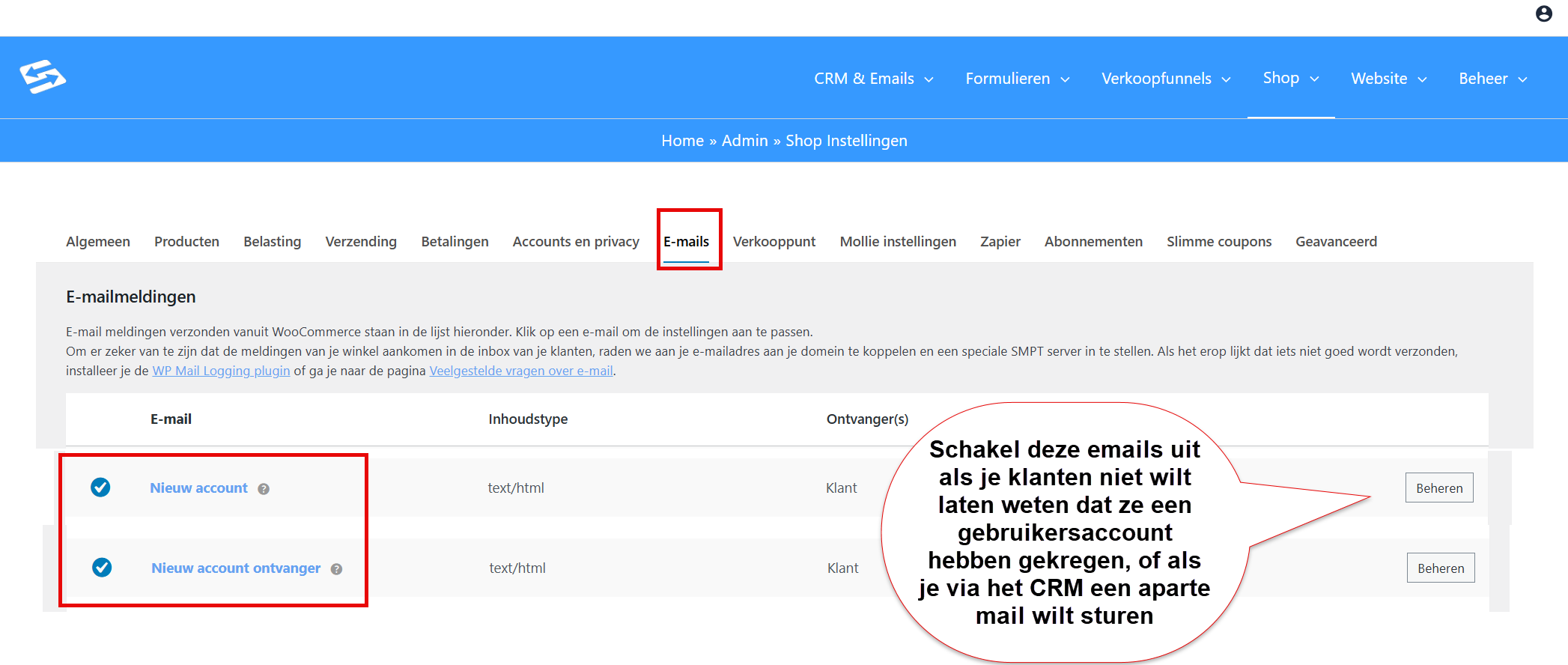
- Optional password setup: After the order the customer receives an email by default to set a password themselves. You can switch off this ‘
New account recipient‘ email. The customer then notices nothing of the underlying user account that has been created for the subscription. - Automatic renewals: Subscription renewals run automatically through Mollie Recurring. With the first payment through iDEAL the customer gives a mandate, after which the amount is collected automatically without any further action. So they never have to log in.
- Manual renewal: if the customer pays through manual renewal, the standard renewal email is sent with the invoice and a payment link. The customer can click the payment link and pay straight away without having to log in. In that case too, they need notice nothing of the underlying user account that is connected to the subscription.
- Smart links for direct access: Through smart links in CRM emails, customers can be sent straight to their account or to a specific page while already logged in, without having to know a password. That is something you can optionally add in the future (if you do want to send a customer an email with which they can look up all their invoices, for example)
The result: customers simply take out a subscription like any other product, and everything works automatically in the background. They never have to log in or know that a user account is linked to the subscription.
What can the customer arrange themselves through ‘My Account’? #
If customers do want to log in to their account, they have access to their personal dashboard through the ‘My Account’ page. Here they can:
- View the subscription status: an overview of active, paused or cancelled subscriptions
- Cancel a subscription: end their subscription themselves (in line with the notice period you set)
- Download invoices: access to all generated invoices in PDF format
- Change payment details: update the billing address, payment address and contact details
- Change the payment method: from direct debit to manual payment or the other way round (depending on your settings)
In order emails and communication to the customer, however, you never really need to refer to this.
What happens with a failed payment? #
If a direct debit fails, the system automatically puts the subscription on hold. The customer then receives an email with a direct payment link to settle the failed payment after all.
At Autorespond we have applied a custom setting that lets customers pay through this link without logging in first. They click the link, pay straight away, and the subscription is activated again. This works seamlessly and the customer does not need to know a password or manage an account.
For more information about setting up renewal emails, see also how to set up announcement emails for subscription renewals.
Optimising the settings for ease of use #
To make user account management run as smoothly as possible, check the following settings:
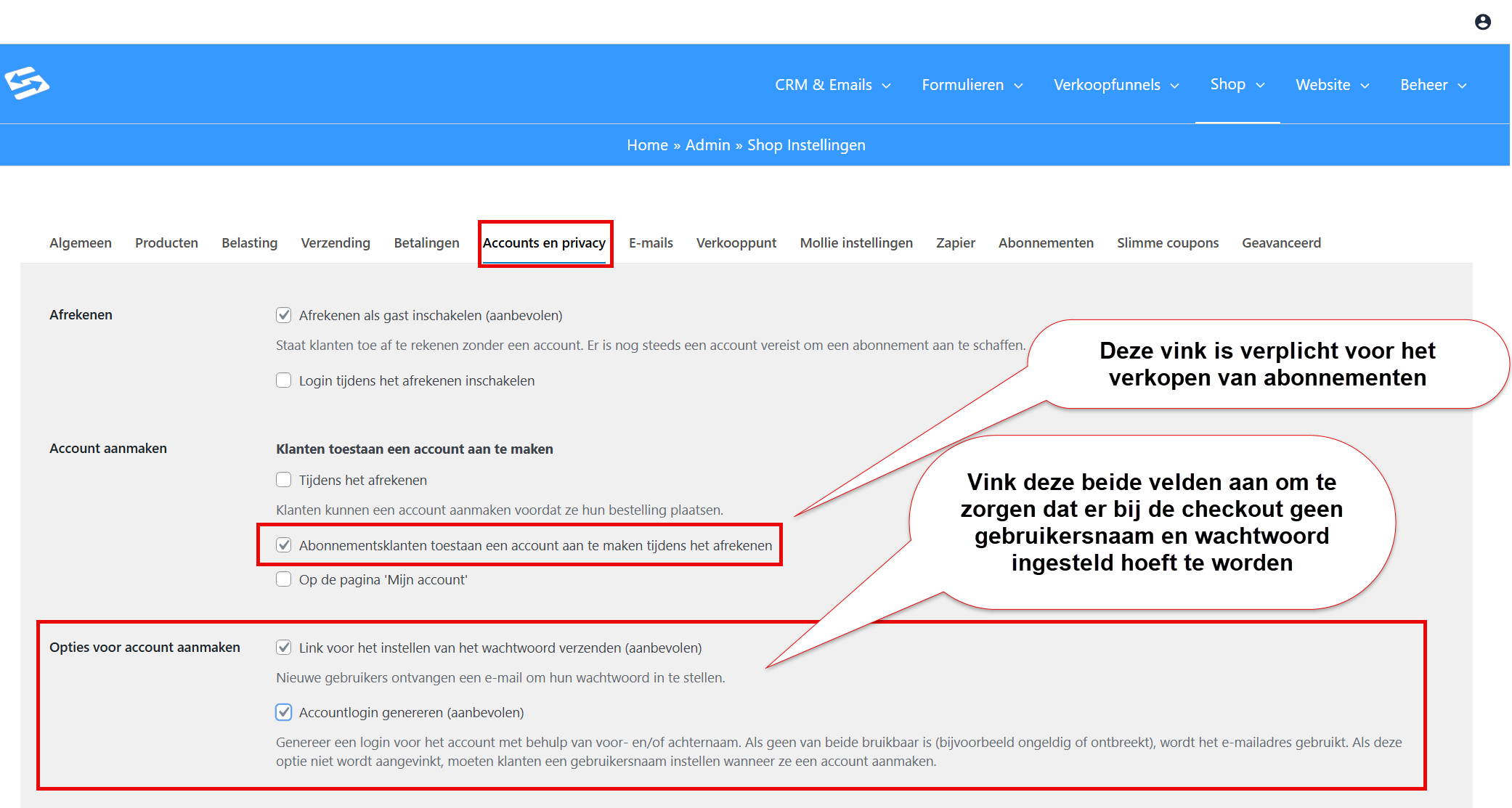
- Go to Shop → Shop Settings and open the ‘Accounts and privacy’ tab
- Make sure ‘Allow subscription customers to create an account during checkout’ is switched on (accounts are required for subscriptions)
- Under ‘Account creation options’ tick both options: Send password setup link (recommended) and Generate account login (recommended). We will switch off the emails this sends on the Emails tab.
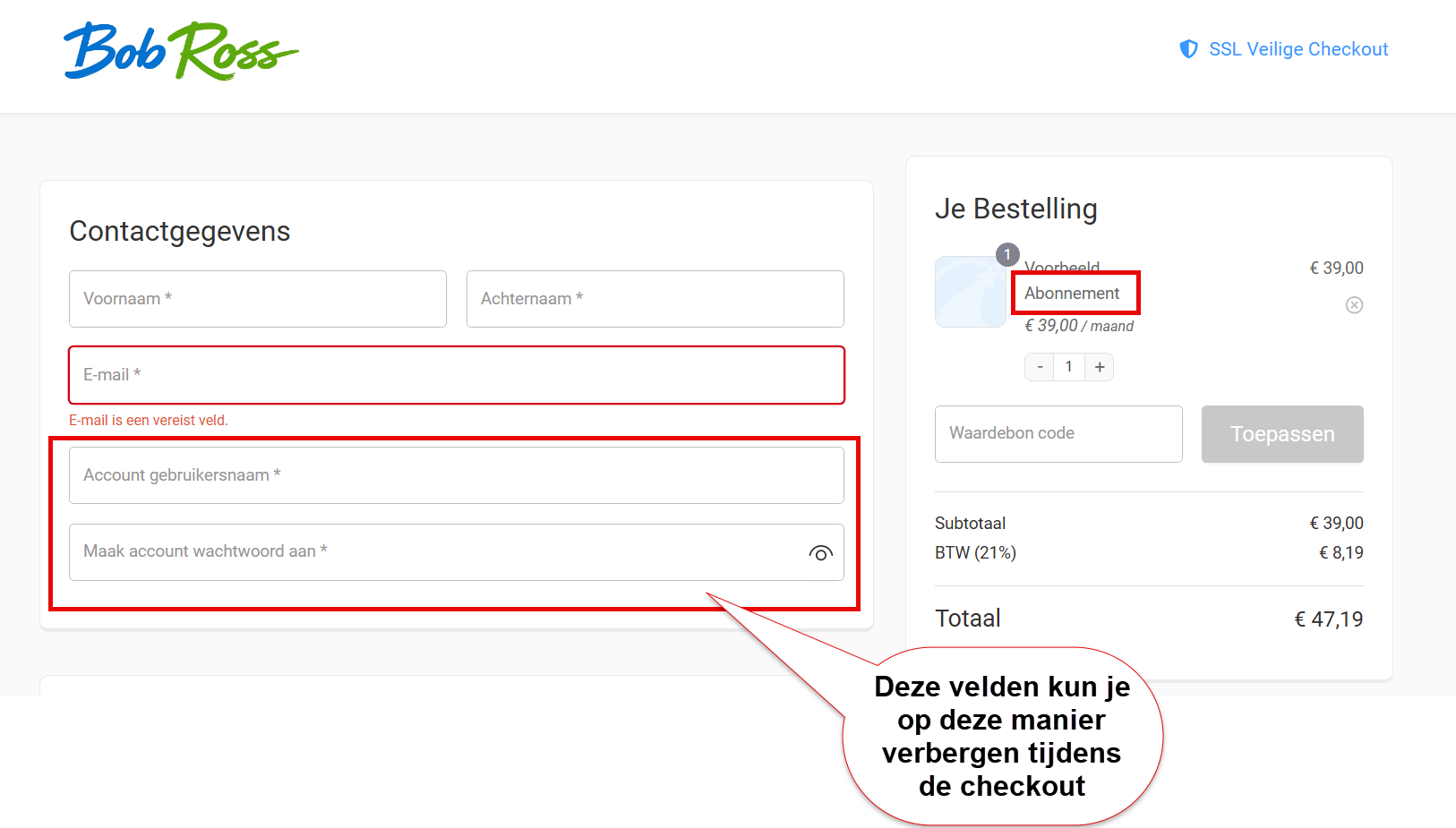
If you want to prevent the user receiving an email that reveals a user account has been created, you can switch off the standard WooCommerce emails for this. That way your customers do not need to know at all that a user account exists which manages the subscription:
For more details about these settings, see the article about standard WooCommerce shop settings.
Frequently asked questions #
Does my customer have to create an account to take out a subscription? #
Technically yes, but in practice your customer need notice nothing of it. The account is created automatically on the basis of the email address during checkout. No username or password has to be entered. You can switch off the standard email for setting a password in the WooCommerce emails.
How does my customer log in if they want to manage their subscription? #
Customers can log in through the ‘My Account’ page on your website with their email address and the password they set. If they have not set a password, they can click ‘Forgot password’ to create one. Easier still: use a smart link in your CRM emails to send customers through already logged in.
My customer sees a login screen when they click the payment link, what now? #
That is unexpected. We have applied a custom setting so that customers can pay through renewal links straight away without logging in. If this happens anyway, contact support through the support portal and we will look at the specific configuration of your webshop. Are you not a customer? Then this is the standard WooCommerce setting. You can only prevent it with custom code.
Can my customer cancel their subscription themselves? #
Yes, customers can cancel their subscription themselves through their ‘My Account’ dashboard. They can log in, go to ‘Subscriptions’ and end the subscription there. The cancellation takes effect in line with the notice period you have set on the product or in the general subscription settings. But if you have never told the customer that an account was created for them, they will probably cancel by email and you will have to stop the subscription manually yourself.
What happens if the automatic payment fails? #
If a direct debit fails, the subscription is put on hold and the customer automatically receives an email with a payment link. They can pay straight away through this link to reactivate the subscription. After a successful payment the subscription is activated again and the following renewals simply continue automatically.


