If you advertise through Google Ads or Facebook (Meta), you want to know which campaigns actually deliver sign-ups: a newsletter subscription, a free e-book or download, or a registration for a workshop. With forms you measure such a conversion on the thank-you page the visitor lands on after submitting. This article explains how to set that up.
Are you tracking purchases through your sales funnels or shop? Those conversions are set up elsewhere, see Measuring conversions with Google Ads, Analytics and the Facebook pixel.
Forms in Autorespond are based on Fluent Forms, included in your package. Read the English documentation
How measurement works with forms #
The principle is simple: someone fills in your form, lands on a thank-you page, and your tracking code sits on that thank-you page (through Google Tag Manager or a Google tag, for example). Every visit to the thank-you page then counts as a conversion. To do this, you send the form on to a thank-you page on your own website, where your tracking code is already in place.
Sending the form on to your thank-you page #
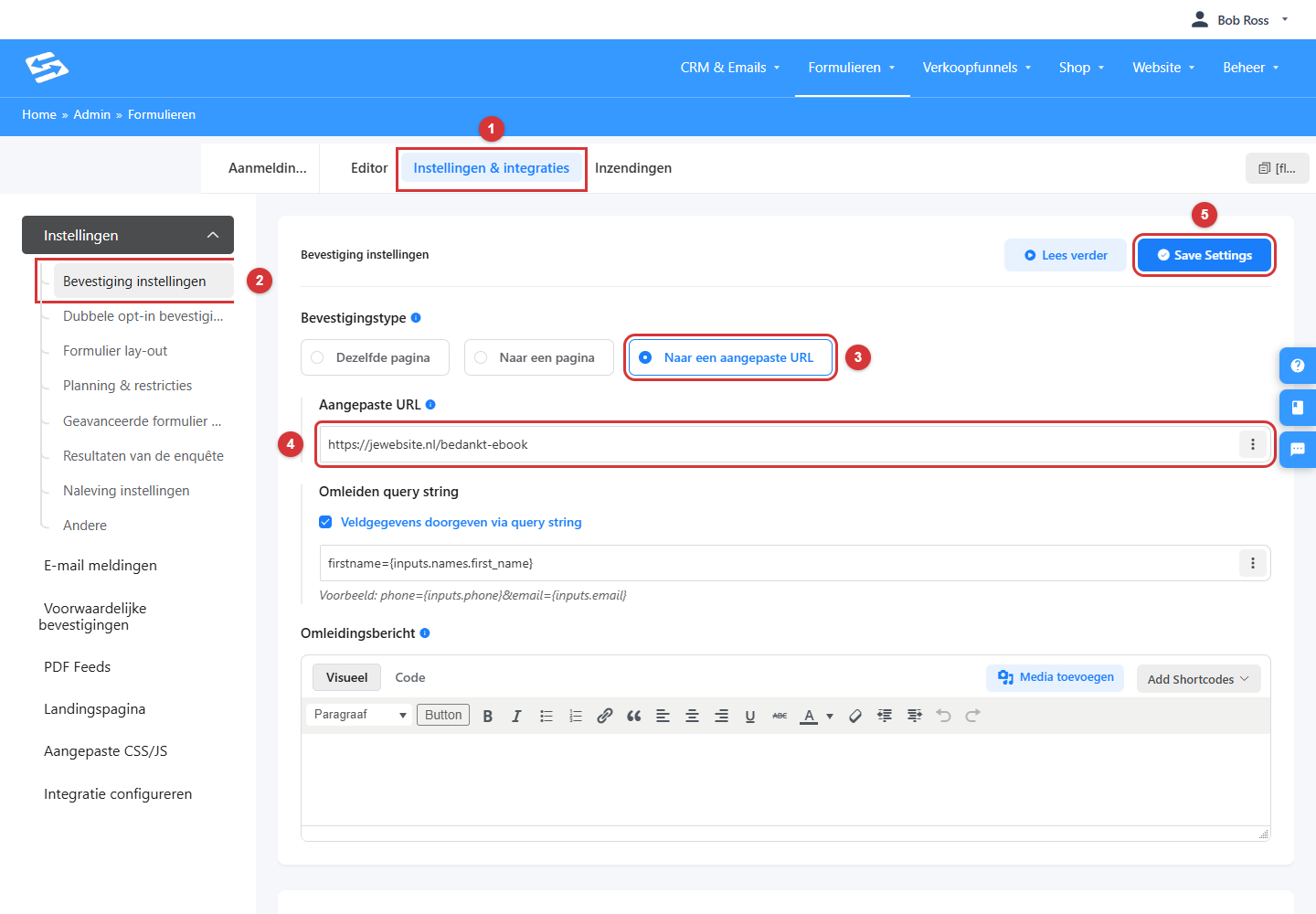
- Go to Forms, open the form and click Settings & integrations at the top.
- Click Confirmation settings in the left-hand column.
- Set the Confirmation type to To a custom URL.
- At Custom URL, enter the full URL of your thank-you page, for example https://yourwebsite.com/thank-you-ebook.
- Click Save Settings.
This screen holds two more useful options. With Redirect query string you pass field data along in the URL of the thank-you page, the first name for instance, so you can greet the visitor personally. And with the Redirect message you set the text that is shown briefly while the visitor is being redirected. If you want to show a different thank-you page per situation (depending on an answer in the form, for example), look at Conditional confirmations in the left-hand column.
Does this also work when the form sits in an iframe on your website? #
Yes. If your form sits on your own website through the embed code (an iframe), the thank-you page you set opens as a full page after submitting, so not inside the iframe. We adjusted the system for this on purpose. Your tracking code on the thank-you page therefore works exactly as it does on a normal page visit. How to place a form on your website is explained in Placing forms on an external website.
Setting up the conversion in Google Ads #
Because your thank-you page is on your own website, you set up the conversion just as you would for any other page on your site: create a conversion action in Google Ads and have it measured through the Google tag or Google Tag Manager on your website, for example with a trigger on a visit to the thank-you page. Google explains this in Set up conversion tracking for your website. For Facebook (Meta) it works the same way, with a pixel event on the thank-you page.
Forms on pages inside your platform #
Is your form not on an external website but on a page of your Autorespond platform itself? Then you can load your tracking code or Google Tag Manager site-wide on the platform through the SEO settings, see Connecting Google Tag Manager and tracking scripts through the SEO settings. You can then measure with the thank-you page method from this article, or in a more advanced way per form submission through Google Tag Manager. Fluent Forms describes that second option in the English manual Fluent Forms event tracking with GA4 via Google Tag Manager. That event method only works when the form and Google Tag Manager are loaded on the same page, so it is not suitable for forms that sit on an external website through an iframe.
Checking that the measurement works #
- Fill in the form yourself and check that you end up on the right thank-you page, as a full page.
- Use Google Tag Assistant to check which tags fire on the thank-you page.
- In Google Ads, conversions often only appear after a few hours to a day. So there is no need to worry if you do not see anything straight away.
Frequently asked questions #
Does this also work for downloads, such as a free e-book? #
Yes. If your download runs through a form (fill it in, then the download or an email with the link), you measure the conversion in the same way: send the form on to a thank-you page with your tracking code.
I have stopped seeing sign-ups and conversions. Where do I start? #
First check whether the form on your website still works and produces sign-ups (look at the Submissions of the form). No submissions means no conversions either; often an old or deleted form is still on the page. If submissions are coming in but conversions are not, look at the confirmation URL of the form and the tracking code on the thank-you page.
Can I measure without a thank-you page of my own? #
With the confirmation type Same page, the visitor stays on the page with the form and there is no thank-you page visit to measure. In that case use the event method through Google Tag Manager (see above), or opt for a thank-you page after all.


